Throughout my journey through assistive technology I have acquired a plethora of valuable knowledge, as well as useful resources/websites, and learned how you can apply assistive technology so that students with disabilities can leverage their strengths and compensate for learning problems.
Before taking this class I was oblivious to the principles of universal design for learning. Now they are something I always refer to first especially if a student is struggling or shows a lack of interest/engagement.
In some of my first posts I touched on barriers in the classroom as well as accommodations for students who are deaf or hard of hearing such as cochlear implants. As I progressed through my quest I discussed how assistive technology is addressed in a student's IEP, and how student's with Autism benefit from visual supports such as a break card due to their deficits in communication.
This blog is something I will continually reflect back on as I work in the field, and moving forward software such as speech recognition and pieces of equipment like alternative keyboards are just a couple of the many things I will incorporate in my classroom.
Reference Below
Dell, A., Newtown, D., & Petroff, J. (2012). Assistive Technology in the Classroom.
Upper Saddle River, NJ. Pearson Education Inc.
Images Found At
https://blogger.googleusercontent.com/img/b/R29vZ2xl/AVvXsEjFXkVFr-qj1ywZangr1CEjpiAS90zPJSxa-uMERCOHwqTgAuTDDYJkw1r_gcBb4OEa8yoKz1_T3Tto1savSaC_VVZsf9zULIVWv89-BqKxvZKNMscwGHBIdDK84hZTTOgtbfY7jIHl8tUL/s1600/409Assistive_Technology_Still.png
http://www.thehappinessgroup.com/wp-content/uploads/2011/06/Taking-the-emotional-journey-e1307035940113.jpg
Wednesday, July 30, 2014
Assistive Technology and Transition Planning
In order for a student to effectively use assistive technology in college, they need to be adequately prepared in high school. Transition planning in high school is important for students with disabilities because there are differences between IDEA and ADA.
Transition plans for students who aspire to go to college need to include the practice and development of two kinds of skills.
1) Acquiring assistive technology skills for independence.
2) Self advocacy skills
Being taught self advocacy skills will better prepare students to articulate their assistive technology needs, and request tools as reasonable accommodations when they get to college. Students need to be given ample opportunities to practice their communication skills so that they become increasingly more comfortable with the technology, and learn to customize it to their individual needs.
Reference Below
Dell, A., Newtown, D., & Petroff, J. (2012). Assistive Technology in the Classroom.
Upper Saddle River, NJ. Pearson Education Inc.
Image Found At
https://blogger.googleusercontent.com/img/b/R29vZ2xl/AVvXsEim-7BZtc2JKS0_IUOGp3c7UqQ0BUJzgPmzUrHfdspvAKgV8oQ_29eq2sgzxIH3EmSMlPBUcuQpsvN69Xb2DFGQj8dnEoxz7KW_Mbzy-_heUmBUc2Z5tXrttpI9Y2EK1E47yqmn0jusK5yt/s1600/college_130c.jpg
Transition plans for students who aspire to go to college need to include the practice and development of two kinds of skills.
1) Acquiring assistive technology skills for independence.
2) Self advocacy skills
Being taught self advocacy skills will better prepare students to articulate their assistive technology needs, and request tools as reasonable accommodations when they get to college. Students need to be given ample opportunities to practice their communication skills so that they become increasingly more comfortable with the technology, and learn to customize it to their individual needs.
Reference Below
Dell, A., Newtown, D., & Petroff, J. (2012). Assistive Technology in the Classroom.
Upper Saddle River, NJ. Pearson Education Inc.
Image Found At
https://blogger.googleusercontent.com/img/b/R29vZ2xl/AVvXsEim-7BZtc2JKS0_IUOGp3c7UqQ0BUJzgPmzUrHfdspvAKgV8oQ_29eq2sgzxIH3EmSMlPBUcuQpsvN69Xb2DFGQj8dnEoxz7KW_Mbzy-_heUmBUc2Z5tXrttpI9Y2EK1E47yqmn0jusK5yt/s1600/college_130c.jpg
Assistive Technology Accomodating College Students
Just like other students college students can benefit from assistive technology accommodations in the classroom, as well as during testing situations, and when completing assignments. College students with disabilities can benefit from word prediction programs when they are writing papers if they are poor spellers, or have poor vision.
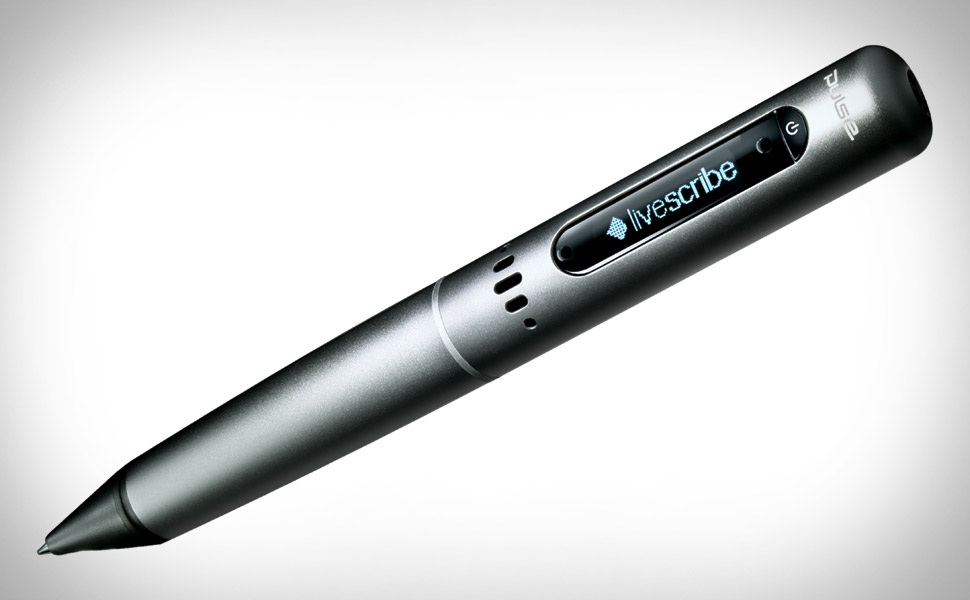
Another viable option for a college student who has trouble writing could be LiveScribe pulse Smartpen. This will allow a student to record a professor's lecture and sync it to the student's notes so that they can go back and check them later.
Reference Below
Dell, A., Newtown, D., & Petroff, J. (2012). Assistive Technology in the Classroom.
Upper Saddle River, NJ. Pearson Education Inc.
Image Found At
http://uncrate.com/p/2010/12/livescribe-pulse-xl.jpg
Image Found At
http://uncrate.com/p/2010/12/livescribe-pulse-xl.jpg
Another viable option for a college student who has trouble writing could be LiveScribe pulse Smartpen. This will allow a student to record a professor's lecture and sync it to the student's notes so that they can go back and check them later.
Reference Below
Dell, A., Newtown, D., & Petroff, J. (2012). Assistive Technology in the Classroom.
Upper Saddle River, NJ. Pearson Education Inc.
Image Found At
http://uncrate.com/p/2010/12/livescribe-pulse-xl.jpg
Image Found At
http://uncrate.com/p/2010/12/livescribe-pulse-xl.jpg
UKAT
Another resource I visited and found useful was the University of Kentucky Assistive Technology (UKAT) project. This website provides an introduction to Assistive Technology, an overview of the toolkit, instructions, and sample applications.
One tool that I found helpful on this website was the knowledge and skills survey. This is a survey of AT knowledge and skills for guiding professional development for school personnel/ related services, students who are or will be using AT, and the parents or other family members of the particular student.
Reference Below
(http://edsrc.uky.edu/www/ukatii/sample/index.html)
Image Found At
http://www.midlandesa.org/wp-content/uploads/2013/10/assistive-tech.png
One tool that I found helpful on this website was the knowledge and skills survey. This is a survey of AT knowledge and skills for guiding professional development for school personnel/ related services, students who are or will be using AT, and the parents or other family members of the particular student.
Reference Below
(http://edsrc.uky.edu/www/ukatii/sample/index.html)
Image Found At
http://www.midlandesa.org/wp-content/uploads/2013/10/assistive-tech.png
OTAP
The Oregon Technology Access Program, which can be found at (http://www.polk-fl.net/districtinfo/rti/images/progchart1.jpg), is a very helpful website/resource for students with disabilities. This website provides training, information, technical assistance, and resources regarding the uses of technology for individuals with disabilities.
One AT link I visited on the website was titled "Geekslp", where I came across a unique application for the I-Pad that Assesses articulation and phonology skills at the sentence level. This app which is called the Sunny Articulation and Phonology Test kit can also evaluate vowels and consonants. This app is user friendly and particularly helpful because it highlights the letters in the sentence which were not correctly articulated. The student can then go back and click on them to receive feedback.
Reference Below
(http://www.polk-fl.net/districtinfo/rti/images/progchart1.jpg)
Image Found At
http://www.smartyearsapps.com/wp-content/uploads/2012/12/sunny-1024x479.jpg
One AT link I visited on the website was titled "Geekslp", where I came across a unique application for the I-Pad that Assesses articulation and phonology skills at the sentence level. This app which is called the Sunny Articulation and Phonology Test kit can also evaluate vowels and consonants. This app is user friendly and particularly helpful because it highlights the letters in the sentence which were not correctly articulated. The student can then go back and click on them to receive feedback.
Reference Below
(http://www.polk-fl.net/districtinfo/rti/images/progchart1.jpg)
Image Found At
http://www.smartyearsapps.com/wp-content/uploads/2012/12/sunny-1024x479.jpg
Monitoring Progress of Students using Augmentative Communication
Each individual student who uses an augmentative communication system needs to be continuously monitored for their progress in acquiring communication skills. You must also monitor the instructor's behavior in regards to the student's augmentative communication for documentation, and use the data to make decisions needed to adjust or change supports which are provided.
Recording data on a student's use of an AC system is something that should be included in their daily schedule. Putting this in place early will help with the IEP and inform you of any decisions that need to be made. This will let you know if a student is or is not progressing toward the development of language and communication skills.
Reference Below
Dell, A., Newtown, D., & Petroff, J. (2012). Assistive Technology in the Classroom.
Upper Saddle River, NJ. Pearson Education Inc.
Image Found At
http://www.polk-fl.net/districtinfo/rti/images/progchart1.jpg
Recording data on a student's use of an AC system is something that should be included in their daily schedule. Putting this in place early will help with the IEP and inform you of any decisions that need to be made. This will let you know if a student is or is not progressing toward the development of language and communication skills.
Reference Below
Dell, A., Newtown, D., & Petroff, J. (2012). Assistive Technology in the Classroom.
Upper Saddle River, NJ. Pearson Education Inc.
Image Found At
http://www.polk-fl.net/districtinfo/rti/images/progchart1.jpg
AC Systems Meeting Communication Needs in the Home/Community
Communication demands in the home and community can be very different from those at school. This is why it is important that parents and other family members are included in AC planning and implementation. This will give the student's family the best chance to support their child's communication attempts in environments other than school.
The family can identify specific communication demands and relevant vocabulary the student uses in the home. This could consist of phrases such as what is for dinner or what are we doing this
weekend.
Parents should also be encouraged to expand their child's communication by helping them expand their communication partners as well as experiences. The more new people and places the student can communicate about and with, the better.
Reference Below
Dell, A., Newtown, D., & Petroff, J. (2012). Assistive Technology in the Classroom.
Upper Saddle River, NJ. Pearson Education Inc.
Image Found At
http://upload.wikimedia.org/wikipedia/commons/d/df/Starbucks_boarded_up_after_riot.jpg
The family can identify specific communication demands and relevant vocabulary the student uses in the home. This could consist of phrases such as what is for dinner or what are we doing this
weekend.
Parents should also be encouraged to expand their child's communication by helping them expand their communication partners as well as experiences. The more new people and places the student can communicate about and with, the better.
Reference Below
Dell, A., Newtown, D., & Petroff, J. (2012). Assistive Technology in the Classroom.
Upper Saddle River, NJ. Pearson Education Inc.
Image Found At
http://upload.wikimedia.org/wikipedia/commons/d/df/Starbucks_boarded_up_after_riot.jpg
Using AC Systems in the Home and Community
It is important to support and promote the use of AC systems in the home and community because it reinforces the communication skills acquired in school, and assists in generalizing these skills across other settings and environments.
Having a working relationship with open lines of communication between school and home is crucial for the success of augmentative communication. Families should be trained in the use of AC systems, and cultural diversity should be considered in the preliminary stages and throughout the implementation process.
Using AC systems can be more difficult in the community setting due to unfamiliar people who are not aware of the AC user and may be less open to accepting a different approach to communication. Teachers can facilitate positive interactions with new communication partners through assemblies or planned outings in the community. The device can be programmed to ask specific questions, and guests can be guided toward the AC user to respond to a question.
I have personally seen how much more progress a student has made when their AC system is used across multiple environments instead of just school. I had one student who could finally request food items via his AC system but his parents refused to use it in the home. This appeared to hinder the student's motivation to use the AC system in school due to inconsistencies between environments.
Reference Below
Dell, A., Newtown, D., & Petroff, J. (2012). Assistive Technology in the Classroom.
Upper Saddle River, NJ. Pearson Education Inc.
Image Found At
http://www.autism-community.com/wp-content/uploads/2011/05/child-using-aac-device.jpg
Having a working relationship with open lines of communication between school and home is crucial for the success of augmentative communication. Families should be trained in the use of AC systems, and cultural diversity should be considered in the preliminary stages and throughout the implementation process.
Using AC systems can be more difficult in the community setting due to unfamiliar people who are not aware of the AC user and may be less open to accepting a different approach to communication. Teachers can facilitate positive interactions with new communication partners through assemblies or planned outings in the community. The device can be programmed to ask specific questions, and guests can be guided toward the AC user to respond to a question.
I have personally seen how much more progress a student has made when their AC system is used across multiple environments instead of just school. I had one student who could finally request food items via his AC system but his parents refused to use it in the home. This appeared to hinder the student's motivation to use the AC system in school due to inconsistencies between environments.
Reference Below
Dell, A., Newtown, D., & Petroff, J. (2012). Assistive Technology in the Classroom.
Upper Saddle River, NJ. Pearson Education Inc.
Image Found At
http://www.autism-community.com/wp-content/uploads/2011/05/child-using-aac-device.jpg
Tuesday, July 29, 2014
Integrating Augmentative Communication into the IEP
When developing an IEP for a student who uses augmentative communication, it is crucial that the student's use is integrated across the day and environments including instructional and non-instructional times.
When developing IEP goals it is vital to remember the device is not a goal in itself, but rather a way to accomplishing a goal.
Two parts that are mandatory to be included in an IEP when a student is using a form of augmentative communication are a list of the AC services to be provided by related services such as a speech language pathologist, and identifying the people responsible for the maintenance and operations of the device. The latter will prevent the student from having long periods of time without a voice when their device breaks or obtains a glitch.
When developing IEP goals it is vital to remember the device is not a goal in itself, but rather a way to accomplishing a goal.
Two parts that are mandatory to be included in an IEP when a student is using a form of augmentative communication are a list of the AC services to be provided by related services such as a speech language pathologist, and identifying the people responsible for the maintenance and operations of the device. The latter will prevent the student from having long periods of time without a voice when their device breaks or obtains a glitch.
Reference Below
Dell, A., Newtown, D., & Petroff, J. (2012). Assistive Technology in the Classroom.
Upper Saddle River, NJ. Pearson Education Inc.
Image Found At
https://blogger.googleusercontent.com/img/b/R29vZ2xl/AVvXsEgRKrNPFtvoToAHkavFxDOC7nHPLq4yj-FyvC7FNFjbovJunA36oAQueoNLEqPAhh1d0AUJk3pwsQKqBajjN_dqyIC1l7WuO-HEWPOlDUqBXnKZVz7Clk2b6abHcUkLR2hmCUbde5vV3-VZ/s1600/IEP-meeting.jpg
Overcoming Learned Helplessness
There are techniques and strategies teachers can implement in the classroom to overcome learned helplessness with students.
A) Create a daily expectation of communication through specific activities the student engages in. This could include picking the activity at recess, choosing where to eat lunch, and selecting a book or magazine to read.
B) Make a concise daily report to parents that is divulged to them by the student.
C) Capitalize on natural consequences that occur, and provide means to amend them. This includes modifying the environment to provide less support or sabotage.
D) Allow the student to make choices whenever possible in their schedule, and require them to do so via their augmentative communication system.
E) Provide the student with phrases on their device that allows them to reject or protest something. This allows the student to advocate for them self and gives them more input in their day to day activities.
A) Create a daily expectation of communication through specific activities the student engages in. This could include picking the activity at recess, choosing where to eat lunch, and selecting a book or magazine to read.
B) Make a concise daily report to parents that is divulged to them by the student.
C) Capitalize on natural consequences that occur, and provide means to amend them. This includes modifying the environment to provide less support or sabotage.
D) Allow the student to make choices whenever possible in their schedule, and require them to do so via their augmentative communication system.
E) Provide the student with phrases on their device that allows them to reject or protest something. This allows the student to advocate for them self and gives them more input in their day to day activities.
Reference Below
Dell, A., Newtown, D., & Petroff, J. (2012). Assistive Technology in the Classroom.
Upper Saddle River, NJ. Pearson Education Inc.
Image Found At
http://www.turned-offchild.com/images/DistortedPerceptions.gif
Resources For Teaching Math
Below are some resources that I found when conducting a search for helpful websites and activities for teaching math, and that I plan on visiting with my students moving forward.
Aplus Math is a website that provides interactive math resources for teachers, parents, and students. This website features free math worksheets, math games, math flash cards, and much more. This website is sorted my math subjects, and even includes a homework helper, which can help students with accurately solving problems/solutions.
Math TV is a platform that features a wide range of math videos covering an abundance of math concepts. You can browse these videos by topic or textbook
AAA Math provides a plethora of arithmetic lessons ranging from kindergarten to eighth grade, and allows the student unlimited practice which allows the student to gain a thorough mastery of the concepts. This website allows learning to occur at each individual's level, and provides immediate feedback to avoid practicing and learning incorrect methods.
http://www.aplusmath.com/
http://www.mathtv.com/
Images Found At
http://mces.pendleton.k12.or.us/sites/mces.pendleton.k12.or.us/files/Image/animations/grade_circled_a_plus_hr.jpg
http://pinecrestfifthgrade.weebly.com/uploads/8/6/3/8/8638946/7556629.png
Aplus Math is a website that provides interactive math resources for teachers, parents, and students. This website features free math worksheets, math games, math flash cards, and much more. This website is sorted my math subjects, and even includes a homework helper, which can help students with accurately solving problems/solutions.
Math TV is a platform that features a wide range of math videos covering an abundance of math concepts. You can browse these videos by topic or textbook
AAA Math provides a plethora of arithmetic lessons ranging from kindergarten to eighth grade, and allows the student unlimited practice which allows the student to gain a thorough mastery of the concepts. This website allows learning to occur at each individual's level, and provides immediate feedback to avoid practicing and learning incorrect methods.
References Below
http://www.321know.com/http://www.aplusmath.com/
http://www.mathtv.com/
Images Found At
http://mces.pendleton.k12.or.us/sites/mces.pendleton.k12.or.us/files/Image/animations/grade_circled_a_plus_hr.jpg
http://pinecrestfifthgrade.weebly.com/uploads/8/6/3/8/8638946/7556629.png
Exploring Manipulatives for Math
As I mentioned in my last post, assistive technology falls on a continuum ranging from low tech to high tech. A manipulative which I will go in detail about below is an example of a low tech device.
Manipulatives can help students understand abstract math concepts and help represent these concepts concretely Virtual manipulatives are digital objects that resemble physical objects and can be manipulated.
The National Library of Virtual Manipulatives, which can be visited at http://nlvm.usu.edu/en/nav/grade_g_1.html, is a library of web-based virtual manipulatives. This library is very helpful and sorted by grade level and math content area. Each manipulative provides instructions as well as activities, lesson plans, and connection to standards.
Tangrams are a virtual manipulative that I found on the NLVM website, which can be integrated into a classroom to enhance students' learning. These are blocks that can be dragged, rotated, and flipped in order to copy designs.
Reference Below
(http://nlvm.usu.edu/en/nav/grade_g_1.html)
Image Found At
https://blogger.googleusercontent.com/img/b/R29vZ2xl/AVvXsEiABCBb_egD1JGtYBqxBVniwagJAhOVD9O8OS12KJgwf7vkyOGvQFDYsYLtvpAaSfg3hUGW-JkKy0o1YupaLseoB3D4tlUllVxb55oWGIY4kPdS8aZFNNcWlOCkCMjny6RfHTjCOLTaTjLq/s400/tangram.jpg
Manipulatives can help students understand abstract math concepts and help represent these concepts concretely Virtual manipulatives are digital objects that resemble physical objects and can be manipulated.
The National Library of Virtual Manipulatives, which can be visited at http://nlvm.usu.edu/en/nav/grade_g_1.html, is a library of web-based virtual manipulatives. This library is very helpful and sorted by grade level and math content area. Each manipulative provides instructions as well as activities, lesson plans, and connection to standards.
Tangrams are a virtual manipulative that I found on the NLVM website, which can be integrated into a classroom to enhance students' learning. These are blocks that can be dragged, rotated, and flipped in order to copy designs.
Reference Below
(http://nlvm.usu.edu/en/nav/grade_g_1.html)
Image Found At
https://blogger.googleusercontent.com/img/b/R29vZ2xl/AVvXsEiABCBb_egD1JGtYBqxBVniwagJAhOVD9O8OS12KJgwf7vkyOGvQFDYsYLtvpAaSfg3hUGW-JkKy0o1YupaLseoB3D4tlUllVxb55oWGIY4kPdS8aZFNNcWlOCkCMjny6RfHTjCOLTaTjLq/s400/tangram.jpg
Low Tech and Mid Tech Adaptations for Math Assignments
This post will touch on several adaptations ranging from low tech to high tech on the assistive technology continuum for teaching math.
Manipulatives are low tech adaptations which have been traditional instructional materials for years, and can be helpful to students with poor fine motor skills.
Onion Mountain Technology makes fraction rubber stamps, a manipulative number line, laminated addition and multiplication tables, and rulers that have transparent overlays. These help students understand the relationship between the different units of measure.
Large Calculators have over sized buttons and are useful for students who have poor motor control or visual impairments.
Talking Calculators provide feedback to students by checking their work aloud by every keystroke that the student enters. Talking calculators also assist students who have poor vision by showing the entire math problem on the screen.
Coin Abacus is a mid tech adaptation that has keys which are shaped and sized like coins. This is designed and used specifically to teach basic money counting skills.

Reference Below
Dell, A., Newtown, D., & Petroff, J. (2012). Assistive Technology in the Classroom.
Upper Saddle River, NJ. Pearson Education Inc.
Images Found At
http://cdn.lssproducts.com/images/uploads/6535_2513_large.jpg
http://www.onionmountaintech.com/img/items/pic2004.jpg
Manipulatives are low tech adaptations which have been traditional instructional materials for years, and can be helpful to students with poor fine motor skills.
Onion Mountain Technology makes fraction rubber stamps, a manipulative number line, laminated addition and multiplication tables, and rulers that have transparent overlays. These help students understand the relationship between the different units of measure.
Large Calculators have over sized buttons and are useful for students who have poor motor control or visual impairments.
Talking Calculators provide feedback to students by checking their work aloud by every keystroke that the student enters. Talking calculators also assist students who have poor vision by showing the entire math problem on the screen.
Coin Abacus is a mid tech adaptation that has keys which are shaped and sized like coins. This is designed and used specifically to teach basic money counting skills.
Reference Below
Dell, A., Newtown, D., & Petroff, J. (2012). Assistive Technology in the Classroom.
Upper Saddle River, NJ. Pearson Education Inc.
Images Found At
http://cdn.lssproducts.com/images/uploads/6535_2513_large.jpg
http://www.onionmountaintech.com/img/items/pic2004.jpg
Applications for Math Concepts, Math Skills, and Problem Solving
When selecting an application we must be mindful that there is a strong correlation between concepts and the developmental level of the student. I will list and go into further detail about educational applications specifically for math concepts, math skills, and problem solving below.
Virtual laboratories are helpful when students are working on advanced probability and statistics. There can also be text given to aid students in understanding the basic theories of probability and statistics.
Math Playground provides students with a plethora of resources for learning math concepts, skills, and problem solving. There is an assortment of activities consisting of but not limited to games, word problems, and puzzles. One activity called thinking blocks helps students practice solve addition, subtraction, multiplication, division, and word problems. Students can check their work after each problem or step and receive feedback.
Conceptua Math helps students with fractions and provides teachers with multiple tools for the use of whole class instruction. The visual models provided in conjunction with spoken text are very helpful for students who are not strong readers. Teachers are able to monitor students' progress, and make necessary instructional changes.
Destination Math focuses on students' developing skills in math reasoning, conceptual understanding, and problem solving. This application helps students' stay engaged by using audio output in addition to animation. There is also a full Spanish version for students who speak English as a second language.
Resource Below
Dell, A., Newtown, D., & Petroff, J. (2012). Assistive Technology in the Classroom.
Upper Saddle River, NJ. Pearson Education Inc.
Images Found At
http://www.mathplayground.com/images/math_playground_header_new_layout.png
http://edtechdigest.files.wordpress.com/2012/12/conceptua-sample-screen-add-fractions.png?w=900
Monday, July 28, 2014
Tools for Visual- Spatial or Motor Control Trouble
Students' with disabilities may have trouble writing numbers or creating/drawing shapes and angles to name a couple, and this could be attributed to fine motor control or visual-spatial problems. This can make the demonstration of the mastery of concepts both difficult and frustrating for students. Fortunately for these students' there are ample educational applications that can help with fine motor control and visual-spatial difficulties. Below I will list and go into further detail about a few of these available applications.
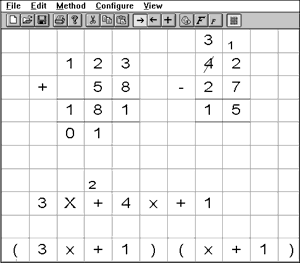
MathPad is a talking math worksheet program that allows students' to do arithmetic problems with whole numbers on the computer the same way in which they would be doing so with a pencil and paper. Student's who have fine motor difficulties can simply solve these problems with the keyboard or by clicking the mouse. The speech output used with this application can aid students' with visual impairments or have problems reading.
Number Navigator (Oats Project) provides a simple math processor that creates mathematical equations or expressions. This application allows students' to enter and solve basic math problems on the computer, and provides customizable colors and fonts.
Microsoft Word has an equation editor which allows students who have a hard time writing by hand to create math equations in correct mathematical notation on the computer. Numerous symbols are provided with his application and entered with a simple mouse click.
Reference Below
Dell, A., Newtown, D., & Petroff, J. (2012). Assistive Technology in the Classroom.
Upper Saddle River, NJ. Pearson Education Inc.
Images Found At
http://cs.brown.edu/~jjl/mathpad/mathpad.jpg
http://numnavigator.sourceforge.net/numnav.gif
MathPad is a talking math worksheet program that allows students' to do arithmetic problems with whole numbers on the computer the same way in which they would be doing so with a pencil and paper. Student's who have fine motor difficulties can simply solve these problems with the keyboard or by clicking the mouse. The speech output used with this application can aid students' with visual impairments or have problems reading.
Number Navigator (Oats Project) provides a simple math processor that creates mathematical equations or expressions. This application allows students' to enter and solve basic math problems on the computer, and provides customizable colors and fonts.
Microsoft Word has an equation editor which allows students who have a hard time writing by hand to create math equations in correct mathematical notation on the computer. Numerous symbols are provided with his application and entered with a simple mouse click.
Reference Below
Dell, A., Newtown, D., & Petroff, J. (2012). Assistive Technology in the Classroom.
Upper Saddle River, NJ. Pearson Education Inc.
Images Found At
http://cs.brown.edu/~jjl/mathpad/mathpad.jpg
http://numnavigator.sourceforge.net/numnav.gif
Apps for Automaticity and Math Fluency
As i mentioned in my previous post, there are a number of questions you want to think long and hard about before selecting an application.
Automaticity is also referred to as math fact fluency which is the fast, accurate, and effortless processing of content information. There is a plethora of educational applications which students can used to build autommaticity and math fact fluency which I will list and go into further detail below.
FASST Math helps students gain math fact fluency by evaluating students' command of basic facts by measuring response time and creating individualized activities based off the results. Students' advance to next activities to strengthen memorization of facts. Teachers can monitor students' progress and make changes if need be.
Timez Attack is only for multiplication, and moves from the 2 to 12 times tables. This app provides students with a video game type environment with high quality graphics that makes it a more appealing program to students'.
Arcademic Skill Builder provides games to assist in developing automaticity in addition, subtraction, multiplication, division, integers, fractions, and ratios. Users can set custom number ranges to provide targeted practice on specific areas of need.
Timez attack is an app I will be using with my students because it looks fun and I believe the video game type format is perfect for motivating and engaging them.
Reference Below
Dell, A., Newtown, D., & Petroff, J. (2012). Assistive Technology in the Classroom.
Upper Saddle River, NJ. Pearson Education Inc.
Images Found At
http://elementarymath.mysdhc.org/27A9B0B5-00757E5A.1/9152010_44238_0.jpg
http://screenshots.en.sftcdn.net/en/scrn/69000/69590/timez-attack-25.jpg
Automaticity is also referred to as math fact fluency which is the fast, accurate, and effortless processing of content information. There is a plethora of educational applications which students can used to build autommaticity and math fact fluency which I will list and go into further detail below.
FASST Math helps students gain math fact fluency by evaluating students' command of basic facts by measuring response time and creating individualized activities based off the results. Students' advance to next activities to strengthen memorization of facts. Teachers can monitor students' progress and make changes if need be.
Timez Attack is only for multiplication, and moves from the 2 to 12 times tables. This app provides students with a video game type environment with high quality graphics that makes it a more appealing program to students'.
Arcademic Skill Builder provides games to assist in developing automaticity in addition, subtraction, multiplication, division, integers, fractions, and ratios. Users can set custom number ranges to provide targeted practice on specific areas of need.
Timez attack is an app I will be using with my students because it looks fun and I believe the video game type format is perfect for motivating and engaging them.
Reference Below
Dell, A., Newtown, D., & Petroff, J. (2012). Assistive Technology in the Classroom.
Upper Saddle River, NJ. Pearson Education Inc.
Images Found At
http://elementarymath.mysdhc.org/27A9B0B5-00757E5A.1/9152010_44238_0.jpg
http://screenshots.en.sftcdn.net/en/scrn/69000/69590/timez-attack-25.jpg
Questions When selecting Apps
There are some important questions to consider when you are selecting educational applications to meet the goals and objectives of students. A few questions to ponder are as follows below.
1) What is the intended outcome of the use of the educational application? For instance is the applications purpose to make math skills stronger, or to gain speed and precision with some basic math facts?
2) Is the educational application selected likely to fulfill its stated purpose? For instance if the goal is to shape problem solving skills, does it offer the feedback needed to accomplish this, or just assess the problems for accuracy?
3) Can the educational applications be used as a substitute to activities to improve students' participation? For instance would students learn as efficiently using online math manipulatives as they would using modern ones?
Reference Below
Dell, A., Newtown, D., & Petroff, J. (2012). Assistive Technology in the Classroom.
Upper Saddle River, NJ. Pearson Education Inc.
Image Found At
http://www.mpsaz.org/ataac/ataac2/math/mathcomp/images/mission.gif
1) What is the intended outcome of the use of the educational application? For instance is the applications purpose to make math skills stronger, or to gain speed and precision with some basic math facts?
2) Is the educational application selected likely to fulfill its stated purpose? For instance if the goal is to shape problem solving skills, does it offer the feedback needed to accomplish this, or just assess the problems for accuracy?
3) Can the educational applications be used as a substitute to activities to improve students' participation? For instance would students learn as efficiently using online math manipulatives as they would using modern ones?
Reference Below
Dell, A., Newtown, D., & Petroff, J. (2012). Assistive Technology in the Classroom.
Upper Saddle River, NJ. Pearson Education Inc.
Image Found At
http://www.mpsaz.org/ataac/ataac2/math/mathcomp/images/mission.gif
Math and AT
Throughout the course of my blog I have touched on various applications of assistive technology, and what skills or subject matter AT can be helpful with. My next posts will discuss using assitive technology for mathematics. Students with physical disabilities may struggle to engage with the tools used in a math curriculum, or drawing shapes or objects. With advancements in technology, students no longer have to rely solely on pencil and paper.
Image Found At
http://atanswers.com/LATImoodle/pluginfile.php/126/course/summary/math_text_symbols.png
Image Found At
http://atanswers.com/LATImoodle/pluginfile.php/126/course/summary/math_text_symbols.png
Tuesday, July 8, 2014
Reading and AT
After listening to the reading webinar about assistive technology for reading I gained some valuable insight on commonly used tools as well as commonly used features. I also never heard of Bookshare which is an accessible online library for electronic text. This is a great option for students with
learning disabilities, reading difficulties, or who have dyslexia. This is available for all students who have IEPs, 504 plans, and who receive specialized services. Moving forward I will look to use this valuable resource with my students in the future to provide a more enjoyable reading experience.
The Text to speech reading support checklist provided in the webinar was very helpful, and I was not cognizant of the importance of some text to speech features such as the quality of the voice. High quality voices are important because they provide inflection. To ensure a high quality voice users should steer away from Microsoft voices and instead try to obtain an acapella voice.
An approach I will utilize in the future is adjusting the rate of speech when using text to speech software. Slowing down the rate when a student is first getting acclimated to the software can make for a smoother transition and easier comprehension.
Resources Below
http://www.gatfl.gatech.edu/tflwiki/index.php?title=Webinar_Archive
Images Found At
http://www.techmynd.com/wp-content/uploads/2010/07/text-to-speech-sitepal.jpg
http://www.ngcybit.it/iTunesApp/images/site_documents/textToSpeech2.png
Speech Recognition
As I mentioned in my last post, I am starting to really understand the importance of multiple means of representation. This also serves true for multiple means of expression. Multiple means of expression yields greater accessibility and flexibility.
Speech recognition is a technology which makes devices more user friendly and accessible by using speech input to trigger an action. This technology can replace typing or clicking which may be difficult to a student with poor fine motor skills. This technology can also promote more independent use of the computer for a student who does not have use of their hands.
SpeakQ is a speech recognition software that enables you to write everything you say from single words to full paragraphs. It also helps with suggesting words a user might have difficulty pronouncing, and lets you mix typing and speaking. This type of assistive technology can aid students with a broad range of physical disabilities and enable them to do things they were not previously able to such as responding to emails, typing word documents, and surfing the internet comfortably.
http://www.goqsoftware.com/speakQ.php
The above website is where you can purchase speakq as well as download a trial. It also provides you with research that supports the efficacy of the product.The website is free of clutter and easy to navigate. They provide many tutorials on how to use and apply the software making it user friendly and better understood for the user.
The above video gives you a brief overview on how speakq works and how easy it is for users to control and customize it to their own individual needs and preferences. Speakq is something I am going to recommend to our related services personnel at school in the future because of how user friendly it is.
Resources Below
http://www.goqsoftware.com/speakQ.php
Images Found At
http://assistive.dtsl.co.nz/images/thumbs/0009520.jpg
http://www.oddcast.com/images/technologies/voice-recognition_illustration.jpg
Subscribe to:
Posts (Atom)